Skip to content
Part 2

How Agents Think

From Paper to Web App

Before we talk about agents, let's cover the basics: what is a web app?

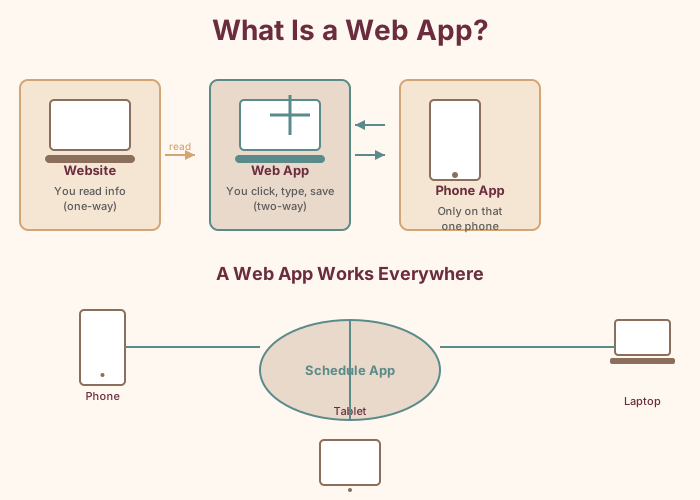
You've used web apps without thinking about it. Google Docs. Gmail. Your online banking. These aren't regular websites—they're applications that run in your browser. You can click buttons, type things, save information, and see changes happen instantly. The key difference: a regular website shows you information. A web app lets you do things.

That's what we're building for Fabulosa Books: something everyone can access from their phone or laptop, no installation required. But unlike a typical web app where all the logic is hand-coded, ours will have AI agents that reason about the schedule.

What is a web app — works on any device, no installation required

What Is an AI Agent?

Step 3: Understand the difference between a chatbot and an agent

You've probably used ChatGPT or a similar chatbot. You type a question, you get an answer. That's useful, but it's reactive—the AI waits for you to ask and then responds. It doesn't do anything in the world.

An agent is different. An agent has a goal and tools. When you give it a task, it doesn't just respond—it figures out what steps to take, uses its tools to gather information or make changes, evaluates the results, and keeps going until the task is done.

  • Chatbot: You ask "Who's available Thursday?" and it says "I don't have access to your schedule."
  • Agent: You ask "Who's available Thursday?" and it queries the database, checks existing assignments, cross-references time-off requests, and tells you "Dylan, Joel, and Carly are available."

The difference is the tools. An agent without tools is just a chatbot. An agent with tools can look things up, validate data, and take actions.
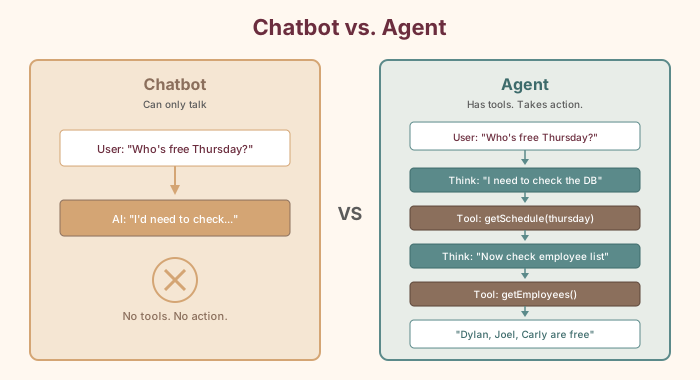
Chatbot vs Agent comparison diagram
Chatbot:
  User: "Who's free Thursday?"
  AI: "I'd need to check your schedule system."

Agent:
  User: "Who's free Thursday?"
  AI thinks: "I need to check the schedule database."
  AI calls tool: getSchedule(thursday)
  AI observes: Marcus=opening, Billy=mid, unassigned=closing
  AI thinks: "Now I need the full employee list to find who's NOT scheduled."
  AI calls tool: getEmployees()
  AI observes: [Alvin, Melissa, Marcus, Dylan, Joel, Billy, Johnny Ray, Carly]
  AI responds: "Dylan, Joel, Alvin, Melissa, Johnny Ray, and Carly are
               available Thursday. Marcus has opening and Billy has mid."
Why Multiple Agents?

Step 4: Understand why one agent isn't enough

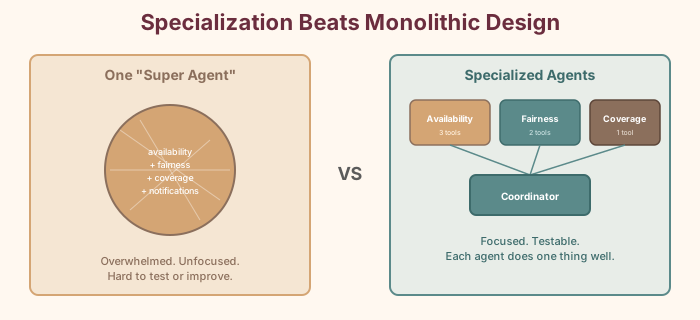
You might wonder: why not build one super-agent that does everything? The same reason Alvin doesn't run the entire bookstore alone.

One agent trying to handle availability, fairness, coverage rules, notifications, and schedule generation all at once would be like asking one employee to staff the register, shelve returns, answer the phone, make coffee, host an event, AND figure out next week's schedule—simultaneously. The results would be mediocre at best.

Specialization works. When you split responsibilities across multiple agents, each one can be:

  • Focused: It has a clear, narrow job. The Fairness Agent doesn't worry about store coverage—it only thinks about whether shifts are distributed equitably.
  • Expert: Its instructions and tools are tailored to its domain.
  • Testable: You can verify each agent independently.
  • Improvable: You can upgrade one agent without touching the others.
Specialization beats monolithic design

The Orchestrator Pattern

Step 5: Understand how agents coordinate

If you have multiple specialized agents, someone has to coordinate them. That's the orchestrator.

Think about how Alvin manages the bookstore. He doesn't shelve books, run the register, AND decide the schedule simultaneously. He delegates. He might say: "Melissa, can you check who's available next week? Marcus, does the event schedule conflict with anything? Joel, make sure we have coverage for Saturday." Then he takes their answers and makes the final decision.

That's exactly what our Schedule Coordinator agent does:

  1. It receives a request from the user: "Schedule next week"
  2. It breaks the request into subtasks
  3. It delegates each subtask to the right specialist agent
  4. It collects the results
  5. It synthesizes a final answer

In the Vercel AI SDK, this pattern is implemented naturally: the coordinator is an agent whose tools are the other agents.

User: "Schedule next week"

Coordinator thinks: "I need to build a schedule. Let me check availability first."
  → calls Availability Agent
  ← "Here's who's available each day: ..."

Coordinator thinks: "Now let me check if the current distribution is fair."
  → calls Fairness Agent
  ← "Marcus has had 3 closing shifts in a row. Dylan hasn't worked Saturday in a month."

Coordinator thinks: "Let me draft a schedule accounting for fairness, then validate coverage."
  → calls Coverage Agent with proposed schedule
  ← "All shifts covered. Saturday closing correctly set to 2pm-9pm."

Coordinator: "Here's the proposed schedule for next week: ..."

Tools: How Agents Act

Step 6: Understand what tools are

A tool is a specific capability you give to an agent. Without tools, an agent can only talk. With tools, it can do things.

In the Vercel AI SDK, a tool has three parts:

  1. A description — what the tool does (in plain English, so the AI understands when to use it)
  2. An input schema — what information the tool needs (defined with Zod)
  3. An execute function — what happens when the tool is called (your actual code)
const getEmployees = tool({
  description: 'Get all employees at Fabulosa Books with their role (regular or on-call)',
  inputSchema: z.object({}),
  execute: async () => {
    const employees = await getAllEmployees()
    return employees
  },
})

The AI model never sees your code. It sees the description and the input schema. Based on those, it decides when to call the tool and what inputs to provide. Your execute function does the actual work.

Our Stack

Step 7: Know the tools we'll use to build this
Tool What It Does Why We Need It
Next.js Full-stack web framework Builds the UI and API routes in one project
Vercel AI SDK Agent and tool framework Creates agents, manages tool loops, streams responses
Vercel AI Gateway Model access API One API key for Claude, GPT, Gemini, and more
Neon Serverless Postgres database Stores employees, schedules, and shift history
Vercel Hosting platform Deploys the app with zero configuration
Zod Schema validation Defines tool input/output shapes with type safety
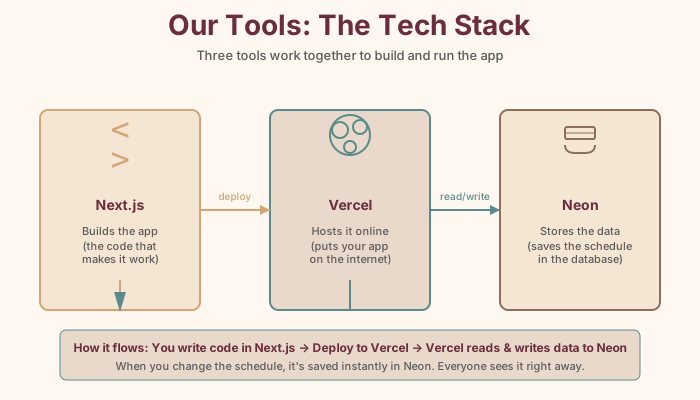
Tech stack: Next.js, Vercel, and Neon

These tools work together naturally. Next.js provides the web framework. The AI SDK provides the agent primitives. The AI Gateway provides model access without managing individual provider accounts. Neon stores the data. Vercel hosts it all. You write TypeScript everywhere.

Let's set it up.